Daily AI Move · 002
Turn your Google reviews into your homepage headline, in your customers' words.
Paste 20 to 30 of your Google reviews into Claude with your current headline, and ask for the three things customers praise most, in their exact words. In about 20 seconds, Claude counts them and rewrites your headline and subheadline from those words. Ask once more and it draws a before-and-after of your homepage.
At a glance
- Built with
- Claude Sonnet 5.5, Medium effort
- Answer time
- 18 seconds, then 13 for the mockup
- Reviews used
- 30 sample reviews
- Cost
- Your existing Claude plan
- Published
58-second walkthrough
Watch it start to finish
The whole build, from an empty chat to a working page, recorded in Claude.
Read the transcript
Your customers already wrote your homepage headline.
It's hiding in your Google reviews.
Start a new chat. Ask Claude for the three things customers praise most, in their exact words.
Add your current headline, then paste in thirty reviews.
Hit send. In about twenty seconds, Claude counts what customers actually praise.
Photos sent by text. The quote is the final price. No upselling.
And here's the kicker. Not one review used the word “quality.”
So “Quality auto repair you can trust” becomes “We text you a photo before we touch your car.”
Ask for a side-by-side mockup, so you see it on your homepage before you change a thing.
Claude even flags the catch. “The quote is the final price.” It's a promise. Only use it if you'll stand behind it every time.
Want the prompt and this mockup? They're at the link in our bio.
Follow MediaMentorAI for one new AI move every day.
Live demo
Try it with your own reviews
We asked Claude to turn its mockup into a tool anyone can try. Paste your own reviews, or load the 30 samples, and it finds what customers praise most and drafts a headline in their words. It runs in your browser, so nothing you paste is uploaded.
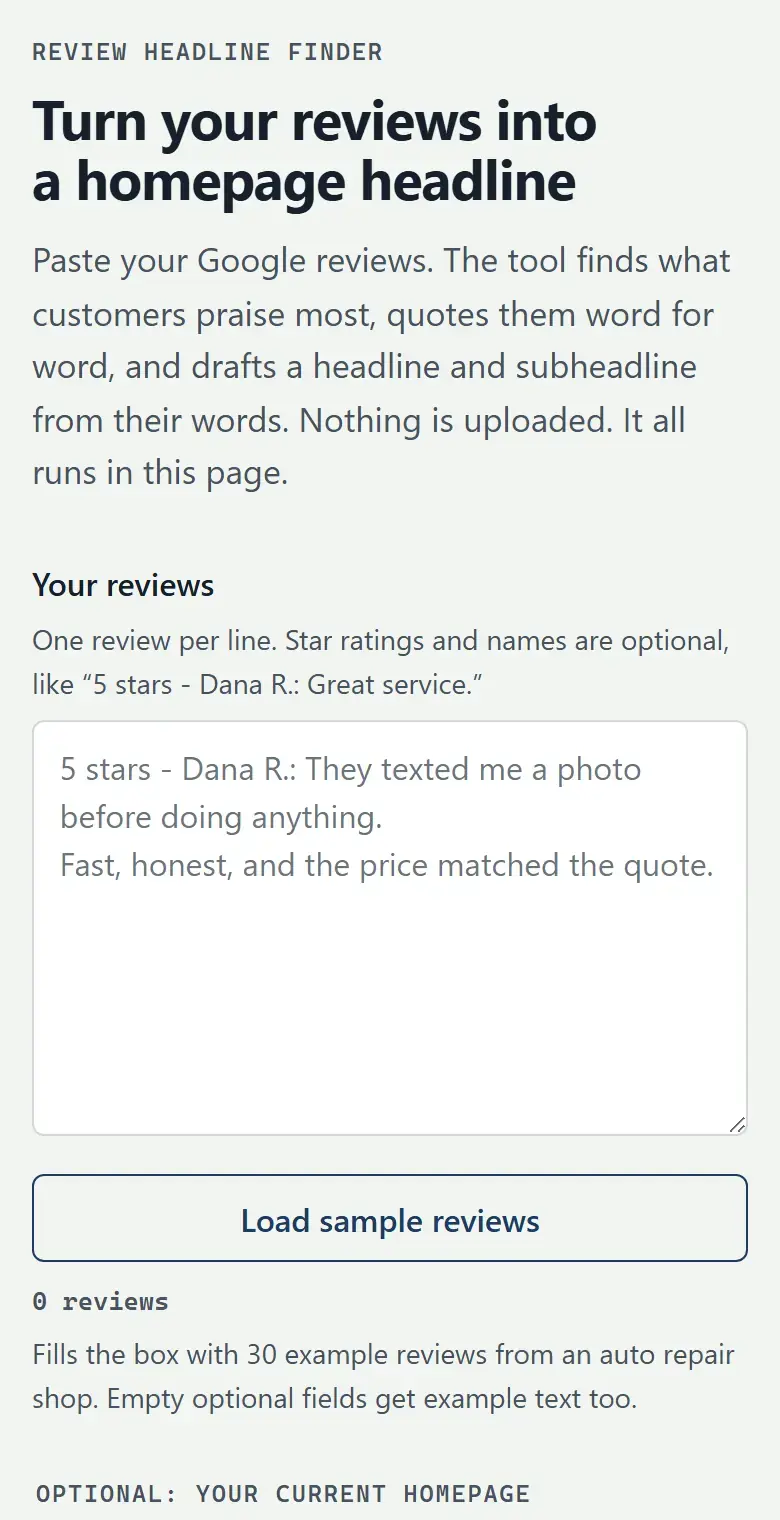
Try this
- Tap Load sample reviews
- Tap Find my headline
- Read the top three themes and the customers' highlighted words
- Scroll down to the before and after
- Now paste 10 or more of your own reviews and run it again
With the samples, you should see photo and video proof in 12 of 30 reviews and the new headline “We text you a photo before we touch your car.”
The tool matches keywords, so it can miss unusual wording. Claude reading your reviews in a chat does this better; use the prompt below for your real headline. The sample shop and its reviews are made up.
Open it full screen (opens in a new tab)Step by step
How to build it in 5 steps
Tested in Claude with Claude Sonnet 5.5, Medium effort.
Copy 20 to 30 reviews
Copy your recent Google reviews into a plain list, one per line, with the star rating and the reviewer's first name. Include the 4-star ones too. We used 30, which was enough for clear patterns.
Reviews from Facebook, Yelp or anywhere else work the same way. Claude only sees the text you paste.
Ask for what customers praise most
Open a new chat in Claude. Ask it to find the three things customers praise most and quote their exact words, then rewrite your homepage headline and subheadline using those words and show a before and after. Add your current headline and subheadline, then paste your reviews under a line that says “Reviews:”.
Read the counts and the quotes
Ours answered in about 18 seconds. It counted photo and video proof sent by text in about 12 of 30 reviews, the quote being the final price in 9 and no upselling in 8, with three exact quotes and a name for each. It also pointed out that no review used the word “quality” and only two said “honest.”
Check each quote against the original review before you use it anywhere.
See it on your homepage
Ask: “Show me the before and after as a mockup of the top of my homepage, side by side.” Ours took about 13 seconds. Claude kept the navigation, buttons and layout the same in both, so the only difference is the words, and added a short customer quote under the new buttons.
Check every promise
Read Claude's notes before you change your site. Ours flagged that “The quote is the final price” is a promise: the reviews support it, but you have to stand behind it every time. Change any line you can't keep, then put the new headline and subheadline on your homepage.
Claude offered to build the new version as a working HTML page you can hand to whoever manages your website.
Copy it
The exact prompt we used
Swap in your own business, headline and reviews, and send it as one message.
Prompt
I run an auto repair shop. Below are 30 of my Google reviews.

Find the 3 things customers praise most, and quote their exact words.
Then rewrite my homepage headline and subheadline using those words.
Show a before and after of the top of my homepage.

Current headline: Quality Auto Repair You Can Trust
Current subheadline: Honest, reliable service since 2009.

Reviews:
[paste 20 to 30 reviews here, one per line]
In our run, the 30 sample reviews went where the last line is; they're in the download. The download is a fuller version of this prompt: it asks about your business and anything you can't promise, counts the praise, rewrites your headline, flags every promise and draws the mockup. ChatGPT can follow it too, but we made this tutorial in Claude.
Under the hood
What Claude built, and why
Read from Claude's answers, its notes, the mockup it drew and the tool it built.
Counts, not a vibe
Claude sorted all 30 reviews into themes and counted each one: photo and video proof sent by text in about 12, the quote being the final price in 9, no upselling in 8. It said plain-English explanations and same-day turnaround came close, about 8 each, and suggested them for body copy further down the page.
Exact words, with names
Each theme came with three quotes in the customer's own words and their name, such as “Final bill matched the quote to the dollar” (Angela W.), so you can check every one against the review.
Your words against theirs
It compared the old copy with the reviews: nobody used the word “quality,” and “honest” came up only twice. Customers described things they saw, like photos, videos and a bill that matched the quote.
A headline about something customers can see
“We Text You a Photo Before We Touch Your Car.” Claude's note: it works because it describes something customers already see and can check, instead of claiming trust. The subheadline kept the true fact from the old one, in business since 2009.
An alternate that leads with price
It offered a second headline in case the shop would rather lead with price: “The Quote Is the Final Price. No Upsell, No BS.”
A mockup where only the words change
The side-by-side kept the navigation, buttons and layout identical, and added an optional proof line under the new buttons: “I could see the cracks myself.” Priya S. It used a placeholder shop name and said to swap in the real name, colors and photo.
A tool anyone can try
We then asked Claude to turn the mockup into one self-contained page with no AI behind it, so it costs nothing to run. It matches 12 kinds of praise by keyword, skips 1- and 2-star reviews and phrases like “not friendly,” quotes whole sentences exactly, and builds the before and after from whatever you paste. It checked its counts against the 30 samples by hand. That's the live demo above.
A warning about promises
Claude flagged on its own that “The quote is the final price” is a promise, and that the owner should only use it if they're comfortable standing behind it every time.
Make it yours
The same move for other businesses
Paste your own reviews the same way. The download asks you the right questions first.
Plumbing
If reviews keep saying they showed up when they said they would, lead with on-time arrival.
Dental office
If patients say “explained everything” or “didn't feel rushed,” lead with how the visit feels.
Restaurant
Lead with the dish people name most, in the words they use for it.
Hair salon
If clients say “finally a stylist who listens,” put that feeling up top.
Landscaping
If reviews mention the cleanup afterward, lead with the yard customers get back.
Accounting
If clients say “no surprises at tax time,” say exactly that.
FAQ
Questions about this tutorial
How many reviews do I need?
We used 30 and got clear patterns. With only a handful, there may not be one, so add more if every theme Claude finds comes from one or two reviews.
Are the reviews in the demo real?
No. The auto repair shop and its 30 reviews are made up for this tutorial, written to sound like real ones. Run it on your own reviews and your themes, counts and headline will be different.
Can I use reviews from Facebook, Yelp or other sites?
Yes. Claude only sees the text you paste, so reviews from anywhere work the same way. We used Google-style reviews in this demo.
Does the demo tool use AI?
No. Claude built it to run entirely in your browser with keyword matching, so it's free to use and nothing you paste leaves your device. For your real headline, paste your reviews into Claude with the prompt on this page: Claude reads for meaning, not just keywords.
Which Claude plan and model did you use?
We used Claude Sonnet 5.5 at the default Medium effort on a paid plan. Plans and limits change, so check Claude's plans page for what yours includes. We haven't tested this on the free plan.
Does this work in ChatGPT?
We made and tested this tutorial in Claude. The downloadable prompt file is written so ChatGPT can follow it too, but we haven't tested it there yet.
Will Claude change my website?
No. It writes the new words and draws a mockup in the chat. It offered to build the new version as a working HTML page you can hand to whoever manages your site. You or your web person put it live.
Will a new headline help my Google ranking?
We didn't test that. The point is a clearer first line for the people who land on your homepage. Words customers use in reviews are often the words they search with, but we haven't measured the effect.
Is it OK to quote customers on my homepage?
Quote them exactly, use first names and last initials only, and leave out anything private. If a review is negative or you're unsure a customer would want to be quoted, leave it out.
Want it to do more?
Keep the good reviews coming.
MediaMentorAI builds review request workflows that ask every customer at the right moment, and review agents that track what customers praise, so your homepage keeps up with your reviews.