Daily AI Move · 004
Turn your refund policy into an answer box for your website, with Claude.
Paste your booking and refund policy into Claude and ask for an answer box: a customer types a question like “Can I cancel?” and it answers in plain words, with the exact line of your policy under the answer. In our run, Claude built it in about a minute and tested 18 questions itself. It runs on keyword matching, so there's no AI behind it to pay for.
At a glance
- Built with
- Claude Sonnet 5.5, Medium effort
- Build time
- 71 seconds, plus one 20-second fix
- Example questions
- 7 tap-to-ask buttons
- Running cost
- None: no AI behind it
- Published
54-second walkthrough
Watch it start to finish
The whole build, from an empty chat to a working page, recorded in Claude.
Read the transcript
Your customers keep asking the same questions. Can I cancel? What if I'm late?
Let your policy answer them, right on your website.
Start a new chat. Ask for an answer box that replies in plain words and shows the exact line from your policy.
Then paste your policy underneath.
In about a minute, Claude builds it, and tests eighteen questions on its own.
Now test it. The example buttons worked, but typing a question didn't.
So just tell Claude. About twenty seconds later, it's fixed.
Can I cancel the day before? Free, up to twenty four hours, with the policy line right under it.
And if your policy doesn't cover it, like grooming cats, it shows your phone number.
It matches keywords, so there's no AI behind it, and nothing to pay per question.
Want this answer box and the prompt? They're at the link in our bio.
Follow MediaMentorAI for one new AI move every day.
Live demo
Ask the answer box Claude built
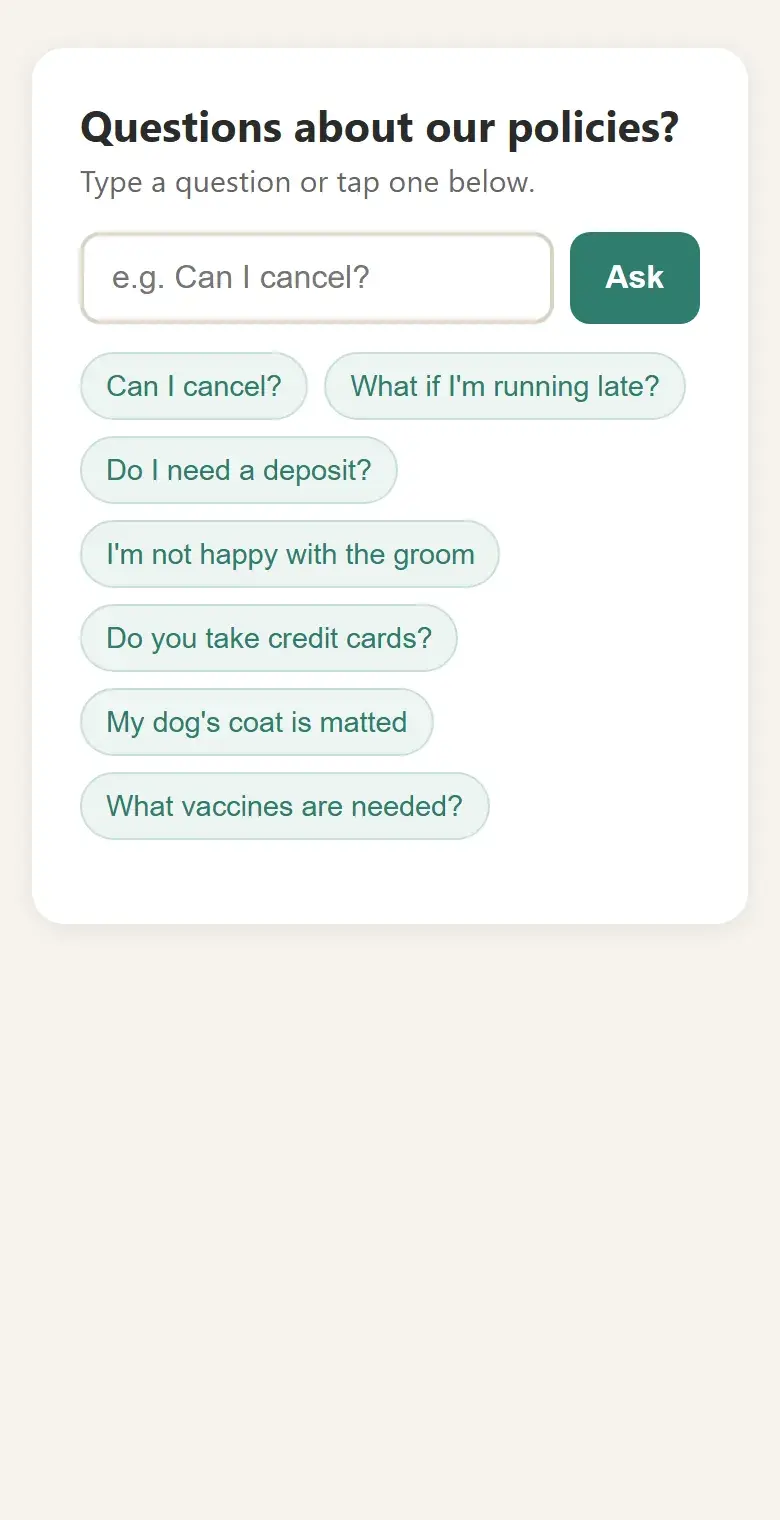
This is the answer box Claude built for a made-up dog grooming salon, after the one fix we asked for. Ask it what a customer would.
Try this
- Type Can I cancel the day before? and tap Ask
- Tap My dog's coat is matted
- Ask Do you groom cats?
You should see a plain answer with the policy line under it, and for cats, a note that the policy doesn't cover it with the salon's phone number.
The salon, policy and phone number are made up. It matches keywords, so an unusual question can miss and show the phone number instead.
Open it full screen (opens in a new tab)Step by step
How to build it in 5 steps
Tested in Claude with Claude Sonnet 5.5, Medium effort.
Copy your policy
Gather the rules customers ask about: cancellations, late arrivals, deposits, refunds, payment. One rule per line, written the way you'd say it, works best.
Ask for the answer box
Open a new chat in Claude. Ask for an answer box that replies in plain words from your policy and shows the exact line it used, with a few example questions to tap and your phone number for anything the policy doesn't cover. Ask for it to work without AI, by matching keywords, so it costs nothing to run. Then paste your policy under the message.
End with “Show it to me here first. Don't publish it yet.” A request that mentions your website can make Claude offer to publish.
Let Claude build and test it
Ours took 71 seconds. Claude ran 18 sample questions through its matching: “can I get my money back” found the refund rule, and “do you groom cats” fell back to the phone number, as it should.
Test it yourself, and say what breaks
In Claude's preview, the example buttons worked but typing a question and pressing Ask did nothing: the preview blocks form submits. We told Claude in one sentence, and about 20 seconds later it had replaced the form so Ask and Enter answer directly. Ask the questions your customers really ask and report any that miss.
Put it on your site
When the answers match your policy, ask Claude for the answer box as one HTML file or an embed code, and add it to your booking or FAQ page. When your policy changes, paste the new version and ask Claude to update it.
Copy it
The exact prompt we used
Swap in your own business, phone number and policy, and send it as one message.
Prompt
I run a dog grooming salon. Below is my booking and refund policy.

Build an answer box for my website. A customer types a question like "Can I cancel?" and it answers in plain words from my policy, then shows the exact policy line it used.
Add a few example questions they can tap.
If my policy doesn't cover the question, say so and show my phone number, (732) 555-0148.
It has to work without AI or the internet, by matching keywords, so it costs nothing to run.
Show it to me here first. Don't publish it yet.

Policy:
[paste your policy here, one rule per line]
In our run, the salon's ten policy rules went where the last line is; they're in the download. The download is a fuller version of this prompt: it checks your policy for gaps first, asks for buttons that work in a chat preview from the start, and tests 15 questions. ChatGPT can follow it too, but we made this tutorial in Claude.
Under the hood
What Claude built, and why
Read from the answer box, its code and the notes Claude wrote about it.
A plain answer, then the exact rule
Every answer is a short sentence in plain words, with the matching line of your policy shown underneath under “From our policy”, so customers can see it isn't made up.
Example questions to tap
Seven buttons cover cancelling, running late, deposits, an unhappy customer, cards, matted coats and vaccines. Tapping one fills the box and answers it.
An honest fallback
When nothing in the policy matches, it says the written policy doesn't cover the question and shows the phone number, which is tappable on a phone. It never guesses.
Keywords with real phrasings
Each rule carries the words customers use, with weights: “money back” points to refunds and “my dog bites” to the stressed-dogs rule. When a question touches two rules, a second one appears as “This may also help”.
Fixed in one message
The first version used a form, which Claude's preview blocks. After one sentence from us, Claude switched the Ask button and the Enter key to answer directly, re-tested and confirmed the cats question still falls back to the phone number.
Nothing to pay per question
It runs entirely in the visitor's browser with no AI, no internet connection and no outside services, so it costs nothing to run however many people use it.
Make it yours
The same move for other businesses
Paste your own policy the same way. The download asks you the right questions.
Gym or studio
Answer questions about freezing, cancelling and guest passes from your membership terms.
Dental office
Answer missed-appointment, insurance and payment-plan questions from your office policy.
Hair salon
Cover late arrivals, deposits for color services and redo policies.
Vacation rental
Answer check-in, pets, deposit and cancellation questions from your house rules.
House cleaning
Cover rescheduling, keys and access, and what happens if something gets broken.
Auto shop
Answer warranty, diagnostic fee and loaner-car questions from your shop policy.
FAQ
Questions about this tutorial
Does the answer box use AI?
No. Claude built it to match keywords and common phrasings, so it runs in the visitor's browser and costs nothing per question. The trade-off: an unusually worded question can miss and show your phone number instead.
Can it give a wrong answer?
It only shows lines from your policy, so it can't invent a rule. It can pick the wrong rule for an oddly worded question, which is why you should test it with real customer questions before you share it.
Why didn't typing a question work at first?
Claude's preview blocks form submits, and the first version used a form. The example buttons worked because they didn't. One sentence to Claude fixed it. The downloadable prompt asks for buttons that work in a preview from the start.
Which Claude plan and model did you use?
We used Claude Sonnet 5.5 at the default Medium effort on a paid plan. Plans and limits change, so check Claude's plans page for what yours includes. We haven't tested this on the free plan.
Does this work in ChatGPT?
We made and tested this tutorial in Claude. The downloadable prompt file is written so ChatGPT can follow it too, but we haven't tested it there yet.
How do I put it on my website?
Ask Claude for the answer box as one HTML file or an embed code, then add it to your booking or FAQ page, or hand it to your web person. The live demo on this page is Claude's file, running on our site.
Want it to do more?
Answer every customer, even after hours.
MediaMentorAI builds AI agents that answer customer questions on your phone line, website and texts from your own policies, and hand anything tricky to a person.