Daily AI Move · 001
Build a quote calculator with Claude, no code needed.
Type your prices into Claude the way you'd explain them to a new hire, then ask for a quote calculator web page. In a couple of minutes, Claude builds one your customers can use on their phone. You don't write any code.
At a glance
- Built with
- Claude Sonnet 5.5, Medium effort
- Build time
- 1:53 and 2:25 in our two runs
- Code needed
- None
- Cost
- Your existing Claude plan
- Published
54-second walkthrough
Watch it start to finish
The whole build, from an empty chat to a working page, recorded in Claude.
Read the transcript
Your customers want a price. Not “it depends.”
So let's build them a quote calculator in Claude. No code.
Start a new chat and type your prices the way you'd explain them to a new hire.
Then ask for a quote calculator web page your customers can use on their phone.
Hit send. In a couple of minutes, Claude builds the whole page right next to your chat.
Now test it like a customer would. Deep clean, three bedrooms, two baths, the fridge, a dog.
Every two weeks? The discount comes right off.
Then read Claude's notes. It tells you every call it made, like whether the discount covers add-ons.
If one's wrong, just tell it. It fixes it.
When it matches your real quotes, open Share, change who can open it, then send customers the link.
Want this exact calculator and the prompt? They're at the link in our bio.
Follow MediaMentorAI for one new AI move every day.
Live demo
Try the calculator Claude built
This is the page Claude built, exactly as it came out, for a made-up house cleaning business. Tap through it the way a customer would.
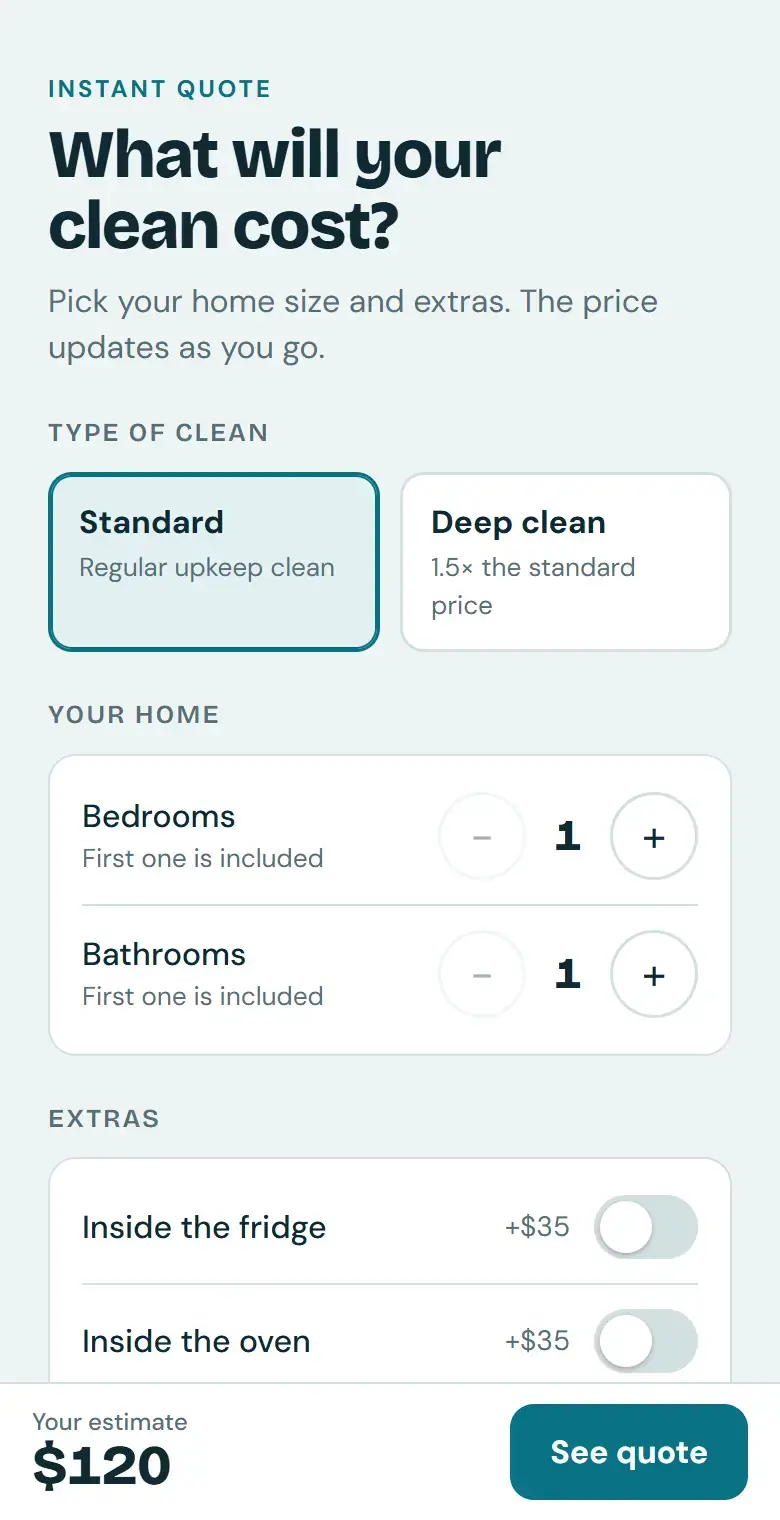
Try this
- Choose Deep clean
- Add two bedrooms and one bathroom
- Switch on Inside the fridge and Pets in the home
- Scroll down and pick Every 2 weeks
You should see $303.87, with the $53.63 discount shown as its own line.
Prices are examples. The Book button shows a quote to copy because this demo has no phone number or booking link.
Open it full screen (opens in a new tab)Step by step
How to build it in 5 steps
Tested in Claude with Claude Sonnet 5.5, Medium effort.
Type your prices
Open a new chat in Claude. Write your pricing the way you'd explain it to a new hire: the starting price and what it includes, what makes a job bigger, your add-ons and your discounts. Then ask for “a quote calculator web page my customers can use on their phone,” and say what customers should see.
Plain lines work. You don't need perfect wording, because Claude tells you how it read anything unclear.
Let Claude build the page
Send the message. Claude writes the whole page and shows a live preview beside your chat. Ours took 1 minute 53 seconds on one run and 2 minutes 25 seconds on another, and we never touched the code.
We used Sonnet 5.5 at the default Medium effort. A higher effort setting was still working after five minutes, so Medium is the better fit here.
Test it like a customer
Click through it the way a customer would. Try a small job, your most common job and a large one, and compare each total with what you'd really charge. In our test, a deep clean of a 3-bedroom, 2-bath home with the fridge add-on, a pet and every-two-weeks service came to $303.87, with the $53.63 discount shown as its own line.
Check its assumptions
Read the notes Claude writes under the page. It lists every place your pricing could be read two ways and what it chose. Ours applied the deep-clean multiplier to the room price only, not to add-ons, and applied the repeat-visit discount to the whole total. If one is wrong, tell Claude in plain words, for example “Apply the discount to the cleaning only, not the add-ons,” and ask it to update the page.
Share the link
When the totals match your real quotes, open Share on the page. It starts private: under General access it says “Only you.” Change who can open it so customers can, then copy the link. Text it to customers, or add it to your website or Google Business Profile.
Anyone with the link can see the prices on the page, so share only prices you're happy to publish.
Copy it
The exact prompt we used
Swap in your own prices and send it as one message.
Prompt
I run a house cleaning business. Build a quote calculator web page my customers can use on their phone.

Standard clean: $120 for 1 bed, 1 bath
Each extra bedroom +$30, each extra bathroom +$25
Deep clean: 1.5x the standard price
Add-ons: inside fridge $35, inside oven $35, laundry $20 a load
Pets in the home: +$15
Weekly 20% off, every 2 weeks 15% off, monthly 10% off

Show the total big, a short breakdown, and a "Book this clean" button.
The download is a fuller version of this prompt. Upload it to Claude, or paste it in, and it asks about your business first, confirms your pricing rules with you, then builds your calculator and gives you three test quotes to check. We tested it in Claude; ChatGPT can follow it too, but we haven't tested it there.
Under the hood
What Claude built, and why
Read from the finished page, its code and the notes Claude wrote under it.
One calm column
Choices come first, then a dark card with the big total and the breakdown. A slim bar keeps the total in view at the bottom of the screen until the customer scrolls to the full quote.
Prices kept in one place
Every price sits in one short list at the top of the code ($120 base, $30 per extra bedroom and so on), so a price change later is a one-line edit you can ask Claude to make.
Its reading of your rules, in writing
Claude listed the calls it made: the 1.5× deep-clean price covers the rooms but not add-ons or the pet fee, and repeat-visit discounts apply to the whole total. It offered to change either one if we asked.
A Book button that works with no setup
With no phone number or booking link to send to, the button shows the quote so the customer can copy it and send it to you. Claude noted that if you give it your number, it can add a button that opens a text message with the quote filled in.
Limits that make sense
Bedrooms run from 1 to 8, bathrooms from 1 to 6 and laundry from 0 to 8 loads. The plus and minus buttons switch off at each limit, so a customer can't build an impossible job.
Made for phones and screen readers
Tap targets are large, every plus and minus button has a spoken name such as “More bedrooms,” and the Book button tells assistive technology whether the quote panel is open.
Rounding that adds up
The discount is rounded to the cent before it's subtracted, so every line in the breakdown adds up to the total a customer sees.
Make it yours
The same move for other businesses
Describe your own pricing the same way. The download asks you the right questions.
Lawn care
Price by lot size, plus edging, leaf cleanup and a weekly-service discount.
Pressure washing
Price per square foot of driveway, deck or siding, with a minimum charge.
Pet grooming
Price by dog size and coat type, plus nail trims and de-shedding.
Window cleaning
Price per window, with extra for upper floors, screens and tracks.
Junk removal
Price by how much of the truck the load fills, plus fees for heavy items.
Lessons and tutoring
Price by session length, with discounts for packages of sessions.
FAQ
Questions about this tutorial
Do I need to know how to code?
No. You describe your pricing in plain sentences and Claude writes the page. You never have to open the code unless you want to.
Which Claude plan and model did you use?
We built it with Claude Sonnet 5.5 at the default Medium effort on a paid plan. Plans and limits change, so check Claude's plans page for what yours includes. We haven't tested this on the free plan.
Does this work in ChatGPT?
We built and tested this tutorial in Claude. The downloadable prompt file is written so ChatGPT can follow it too, but we haven't tested it there yet.
How do customers open the calculator?
Use the Share button on the page in Claude. The page starts private, so change who can open it, then copy the link. You can text the link, email it, or add it to your website or Google Business Profile.
Can I put the calculator on my own website?
Yes. Ask Claude for the finished page as one HTML file, then add it to your site as its own page or embed it in an existing one. The live demo on this page is Claude's file, running on our site.
Does the “Book this clean” button book appointments?
Not by itself. With no phone number or booking link, it shows the quote so the customer can copy it and send it to you. Give Claude your number and it can open a text message with the quote filled in, or point the button at your booking page.
Can customers see my prices before I share the page?
No. The page stays private to your Claude account until you change who can open it. Once you share it, anyone with the link can see the prices it shows.
How accurate are the quotes?
As accurate as the rules you give it. Claude follows them as written, so test with real jobs before you share, and keep the note that the final price is confirmed when you book.
Want it to do more?
Turn quotes into booked jobs.
MediaMentorAI connects tools like this to your phone, calendar and follow-up, so a quote turns into a scheduled job with less back-and-forth.